


1. What is a Token Card?
A Token Card (Token) is an electronic device used to authenticate users instead of the standard username/transaction password mechanism, intended for FPTS customers conducting transactions via telephone and the internet.
Each Token has a unique serial number consisting of 8 or 10 characters on the back (for example: 12345678) and is linked by FPTS to a specific customer upon registration for using Token.
The Token operates by automatically generating random sequences of numbers (consisting of 06 digits displayed on the Token screen) which change continuously every 30 seconds. The security mechanism of each Token is the continuously generated and unique code which are synchronized and authenticated by the server located at FPTS.
Apart from the 06 self-generated numbers on the screen, the Token allows customers to enter and memorize an additional PIN code consisting of 4 to 8 digits (customers may choose to use this function or not). Detailed installation instructions can be found on the website: https://eztrade.fpts.com.vn.
2. Benefits of Using a Token
With a compact size similar to a USB device, the Token is very easy to use and convenient. Customers do not need to download software, install or perform any additional operations when using the Token.
The Token provides a very high level of security with the probability of password theft being nearly "zero". Each Token code is valid only for a single transaction at a specific time and for a specific customer. Therefore, if a Token code is exposed, it will become invalid for subsequent transactions.
3. How to use a Token in Trading
- Regulations on management and use of the Token Card here
- Steps for trading via telephone:
- Step 1: The customer provides the necessary transaction information for the broker, such as: buy/sell, type of securities, volume, price, account number, etc.
- Step 2: The customer provides the Token code for the broker to confirm the transaction.
Note: The Token code refers to the 6-digit number displayed on the Token screen (or the PIN code plus the 6-digit number on the screen if the customer set up an additional PIN).
- Steps for trading via internet:
- Step 1: The customer logs into the FPTS EzTrade service at www.fpts.com.vn or https://eztrade.fpts.com.vn using the securities account number 058Cxxxxxx and the regular login password provided by FPTS.
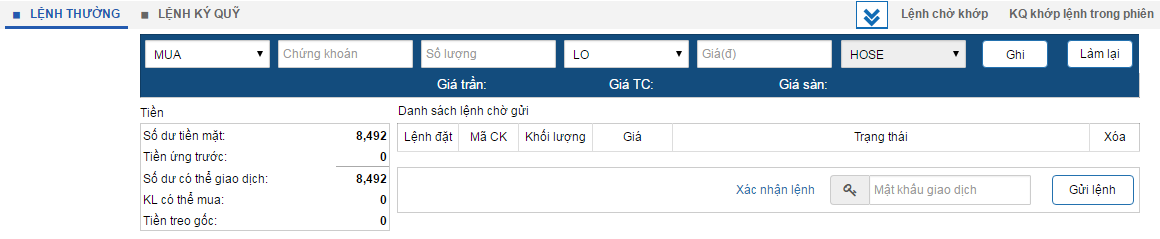
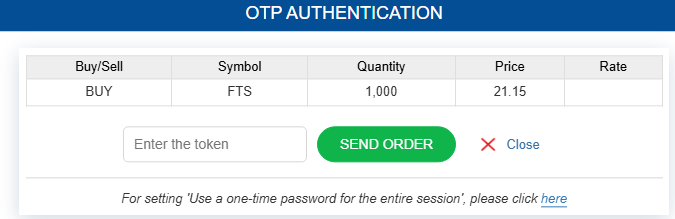
- Step 2: The customer places an order by filling in all required information on the Order Placement screen and selecting "Save", then enters the Token Code as the trading password and clicks "Send Order".
4. Token Card Management Support
This function supports customers in tracking and self-managing their Token. Customers can track usage logs, synchronize the Token code, and set up a PIN. For more details, please refer to the "Token Management" at https://eztrade.fpts.com.vn
1. When does a Token Card lose synchronization?
- Due to a time discrepancy between the customer's Token and the management server
- Or when the customer enters the wrong password three consecutive times
2. Token Card Synchronization
Customers can self-synchronize by logging into their online trading account at https://eztrade.fpts.com.vn
- Click on the account number "058Cxxxxxx" -> select Token Management
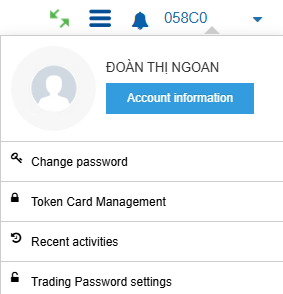
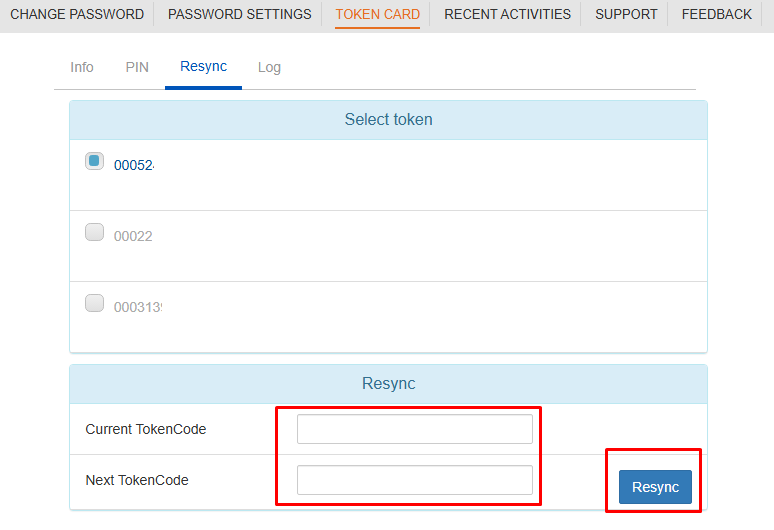
- Select Synchronize

- Enter the Token code twice consecutively -> click Synchronize
- Or contact the FPTS Customer Service Department directly for support. After verifying account information, the FPTS Customer Service Department will request the customer to provide the Token code twice consecutively for synchronization.
3. Token Maintenance:
- The Token is designed with special materials to ensure durability throughout its usage. However, to ensure optimal performance, the Token should be stored in appropriate places and kept away from extreme environments such as:
- Extremely high temperatures (fire, dryers, ovens) which can damage the casing and devices.
- Excessively wet environments (water, washing machines): Although designed to be water-resistant, avoid immersion to maintain durability and accuracy.
- Avoid throwing the device from heights, crushing it with heavy objects, or strong impacts.
- Do not disassemble or tamper with the internal components into the Token.
- Keep the Token in a safe location to avoid loss or theft.
4. Important notes
- Customers can use the Token for trading throughout Vietnam and abroad.
- The Token code is only valid for a specific 30-second period.
- If a customer enters a Token code but does not click confirm before the Token switches to a new number, the order will not be accepted.
- If a customer enters multiple orders consecutively within a 30-second period, the orders following the first one will not be accepted.
- The Token's usage period is recorded on the back of the device. Customers should not attempt to open the device or change the battery themselves to avoid damaging the Token.