


The steps for placing an order are the same as for placing a regular buy/sell securities order
You can refer to the instructions here.
1. Intraday Buying Power (SMTN) Service
The Intraday Buying Power Service is an add-on service for customers using Margin Trading by Buying Power (EzMarginPro) that helps optimize trading buying power for short-term intraday trading. The Intraday Buying Power Service temporarily increases your account's buying power at the start of each trading session, by calculating the Margin Ratio (TLsm) for all margin securities symbols at the maximum level permitted under current regulatory rules (currently 50%). The increased buying power is valid only until the end of that trading session
Example of using the Intraday Buying Power service:
- At the end of day T: Your portfolio is as follows:
|
Symbol |
Ordinary securities |
Pending rights |
Market price |
TLsm |
Margin ratio for rights |
Leveraged buying power from securities |
|
(%) |
||||||
|
ACB |
2.000 |
0 |
20.000 |
50 |
35 |
20.000.000 |
|
HDM |
5.000 |
0 |
30.000 |
0 |
0 |
0 |
|
OCB |
10.000 |
5.000 |
15.000 |
40 |
28 |
81.000.000 |
|
TCH |
5.000 |
0 |
10.000 |
20 |
14 |
10.000.000 |
|
Total |
111.000.000 |
|||||
- If you register for the Intraday Buying Power service: Your margin ratio calculation will use the highest rate set by FPTS (currently 50%) for securities symbols eligible for margin lending. In this case, the leveraged buying power from ACB, OCB, and TCH shares will be calculated at a rate of 50% (including both the ordinary securities and pending rights portions). Specifically:
|
Symbol |
Ordinary securities |
Pending rights |
Market price |
Intraday margin ratio (%) |
Leveraged buying power from securities (after update) |
Buying power difference |
|
ACB |
2.000 |
0 |
20.000 |
50 |
20.000.000 |
0 |
|
HDM |
5.000 |
0 |
30.000 |
0 |
0 |
0 |
|
OCB |
10.000 |
5.000 |
15.000 |
50 |
112.500.000 |
31.500.000 |
|
TCH |
5.000 |
0 |
10.000 |
50 |
25.000.000 |
15.000.000 |
|
Total |
157.500.000 |
46.500.000 |
||||
- Your leveraged buying power from securities will increase by VND 46,500,000 → This is exactly the Intraday Buying Power amount
Note:
- The Intraday Buying Power (SMTN) amount is added to your leveraged buying power from securities and is updated only once, when the system opens the market for the next trading session.
- The intraday leveraged buying power from securities applies only to securities purchase transactions, and does not apply to other transactions such as cash withdrawals/transfers, rights exercises, etc.
- Symbols bought during the session will still be calculated using the regular loan ratio
- If your account currently has a negative base buying power: increasing the Intraday Buying Power (SMTN) will first offset the negative Base Buying Power (SMCS) balance → you will be able to use less of the SMTN amount than expected.
- After the trading session ends, the loan ratio for each margin securities symbol is calculated based on the rate FPTS publishes from time to time, as the basis for calculating your account's Loan Ratio (R)
2. Registering for the Intraday Buying Power (SMTN) Service
You can register for the Intraday Buying Power package in person at an FPTS Head Office/Branch/Transaction Office, or online via the EzTrade website or the EzTrade mobile trading application
To do this via the EzTrade website:
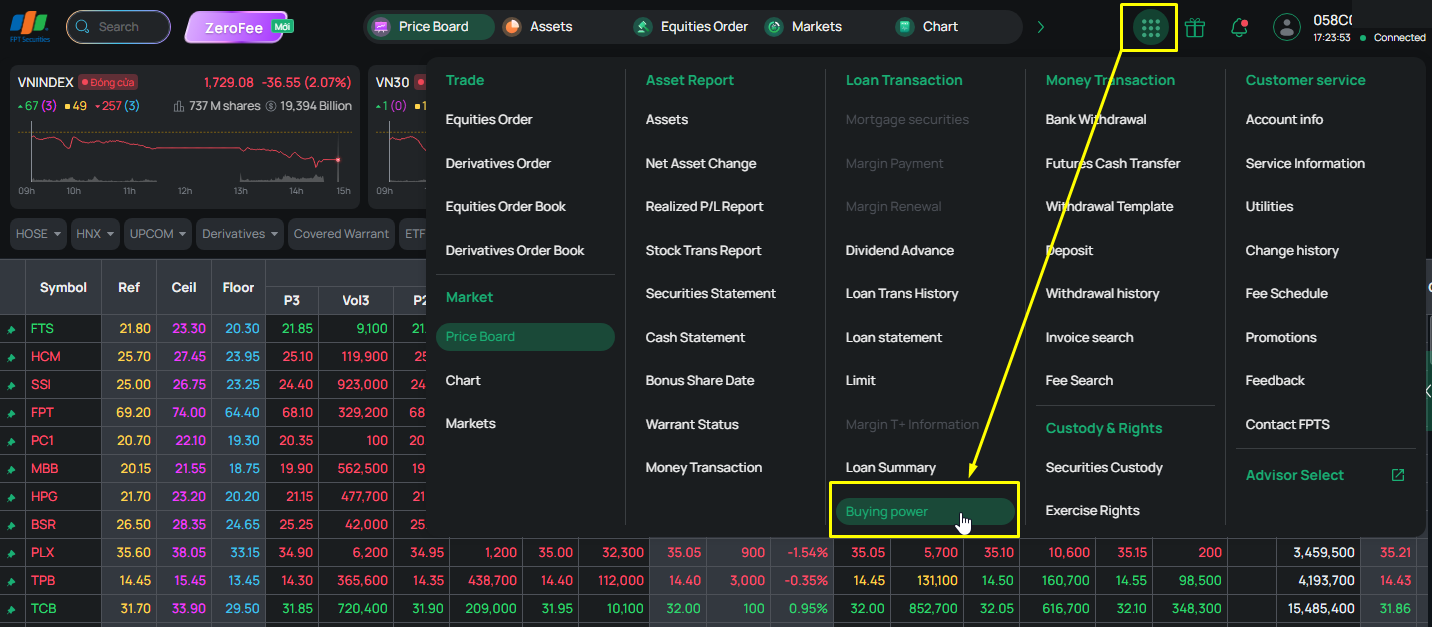
Step 1: Go to Function List and select Intraday Buying Power
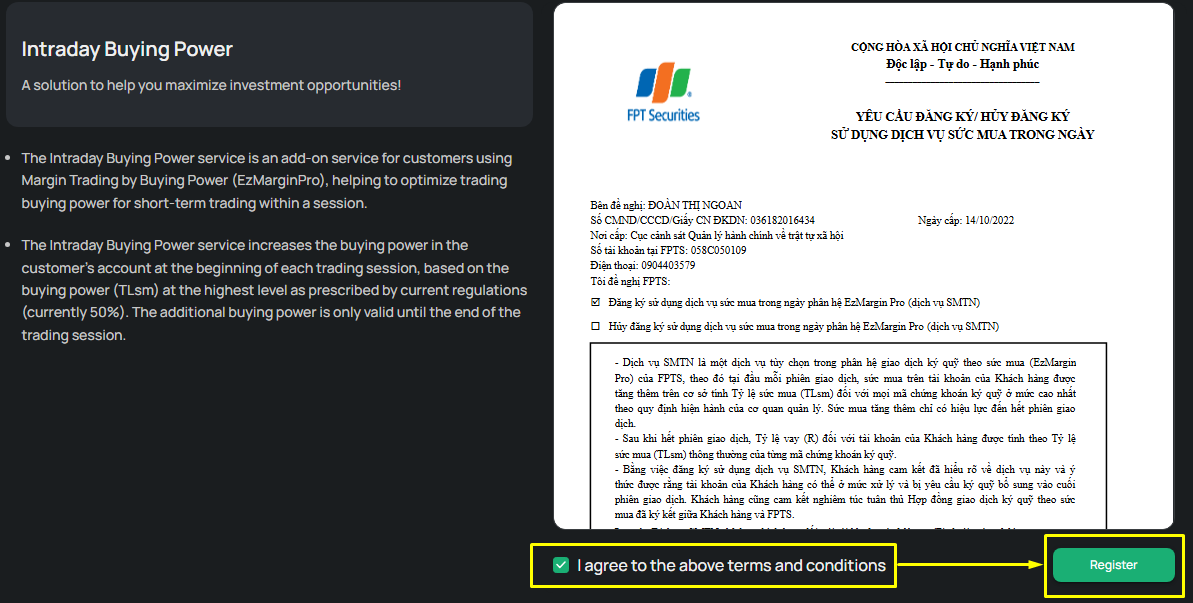
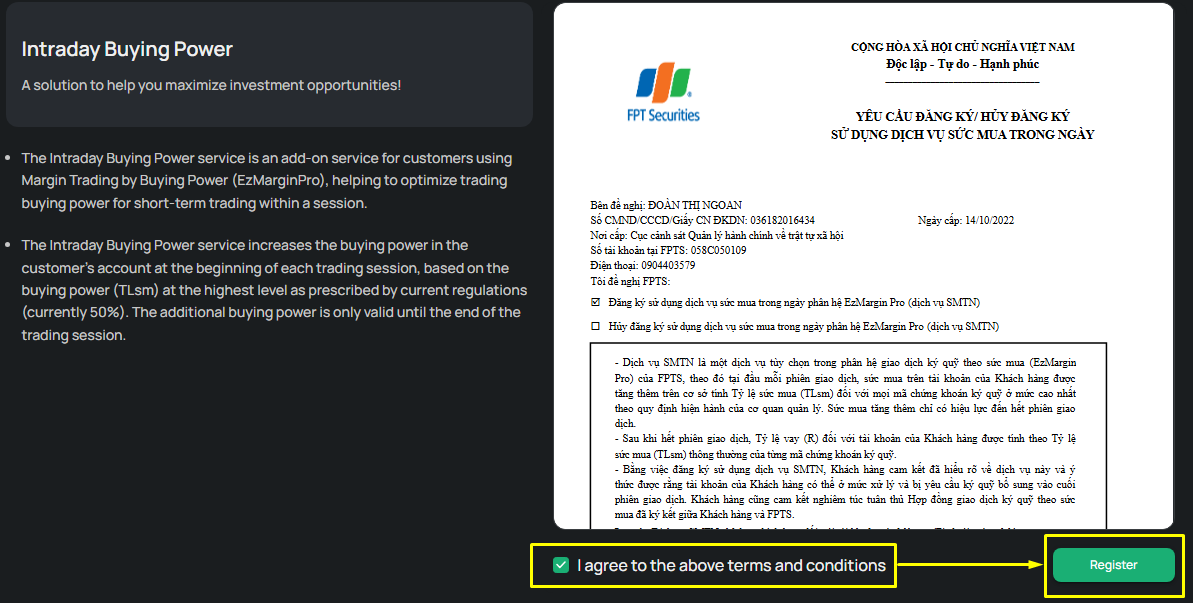
Step 2: The service registration screen appears; carefully read the Registration/Cancellation Request form and check the box “I agree to the above terms.” Then click Register, enter the OTP, and confirm
3. Looking Up Intraday Buying Power (SMTN)
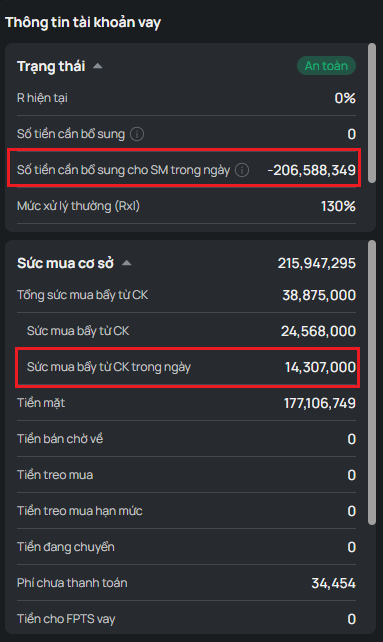
On the EzTrade website, you can go to Function List and select Margin Account Summary. The margin account information screen will appear, allowing you to check the details of your intraday buying power as well as your account status, making risk management easier.
Note:
- Amount required to top up Intraday Buying Power: The amount needed to top up the Intraday Buying Power already used, corresponding to a provisional Risk Ratio (R) of 120%.
- If this amount is > 0: The amount you need to add to bring R back to 120%
- If this amount is < 0: The amount you can still use up to R = 120%
- If the Amount Required to Top Up Intraday Buying Power is > 0, and you do not sell securities or deposit funds to cover it, then once FPTS runs its end-of-day process, your account's R ratio will be recalculated using the regular loan ratio → your account's status may fall into Processing, and the system will classify and process the MarginPro account accordingly
4. Canceling Intraday Buying Power (SMTN)
When you no longer need it, you can cancel the service in person at an FPTS Head Office/Branch/Transaction Office, or online via the EzTrade website or the EzTrade mobile trading application
To do this via the EzTrade website:
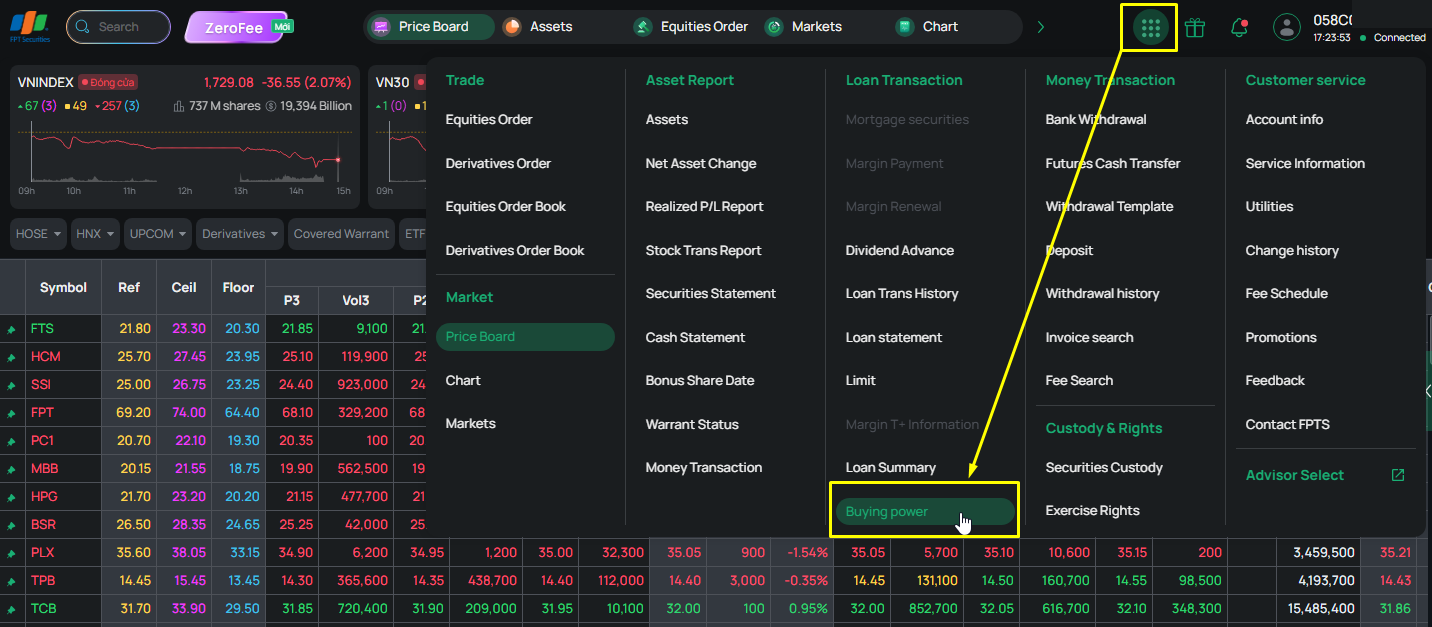
Step 1: Go to Function List and select Intraday Buying Power
Step 2: The service screen appears; carefully read the Registration/Cancellation Request form and check the box “I agree to the above terms.” Then click Cancel, enter the OTP, and confirm
Once completed, the cancellation will take effect from the next trading session
If you have used nearly all of your limit and need more, you can submit a Limit Change Request online via the EzTrade website or the EzTrade mobile trading application
* To do this via the EzTrade website:
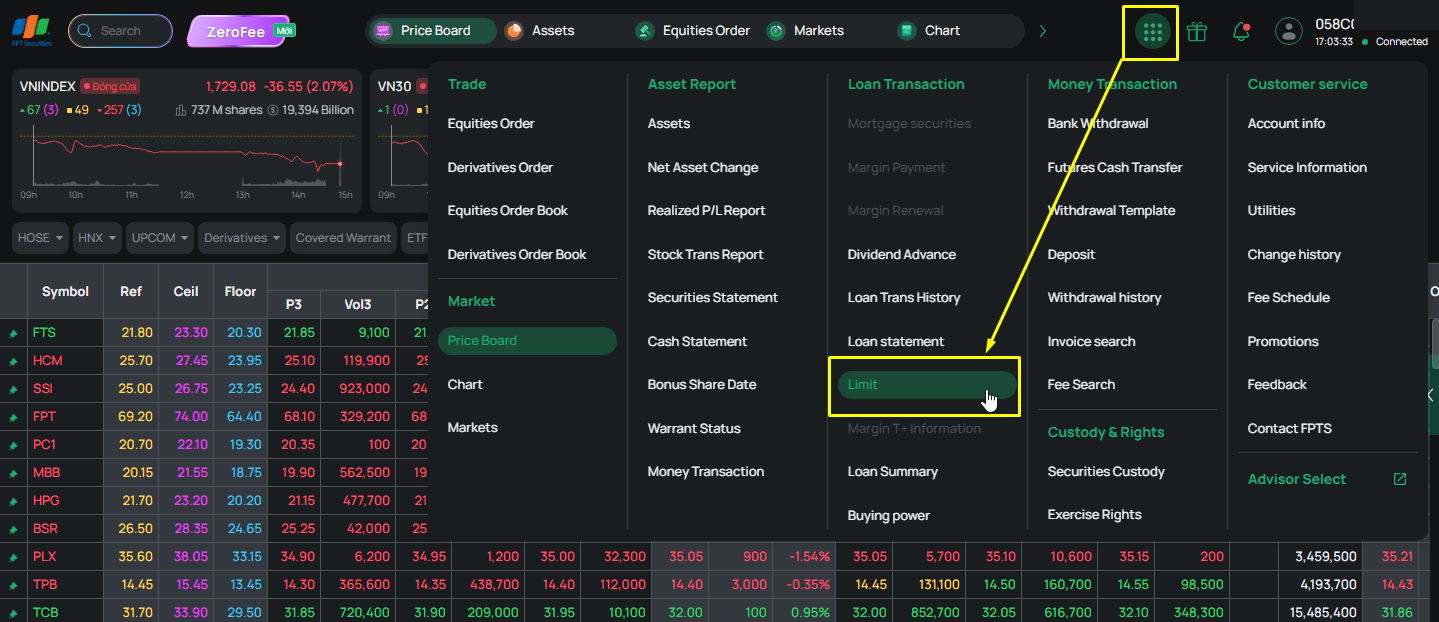
Step 1: Go to Function List and select Limit. The Limit screen will appear, allowing you to request a limit change.
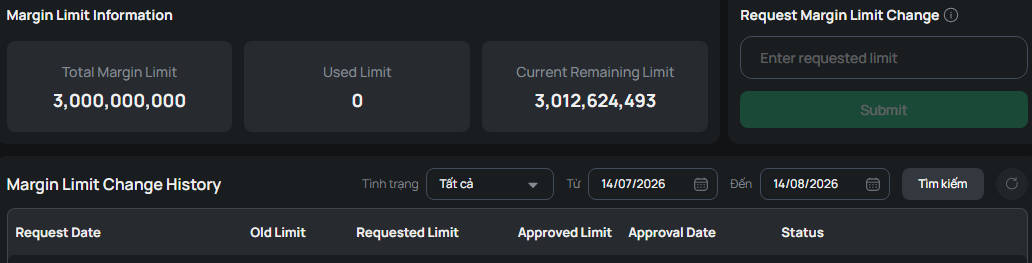
Step 2: Enter your desired limit in the Requested Limit field. Click Request, enter the OTP code, and click Confirm to send the request to FPTS. You can track the request's status and the actual limit approved by FPTS on this same screen
For a limit increase request:
- A request to increase the limit above VND 3 billion requires FPTS's assessment.
- A customer who signed an electronic contract and wants to request a limit above VND 1 billion must sign a hard-copy contract
Note: An online limit change request submitted between 7:00 PM the previous day and 8:00 AM the next trading session (outside business hours) for an amount greater than VND 3 billion will not be approved immediately
The margin call and margin call deadline correspond to the following Loan Ratio levels:
|
STT |
Processing Level |
Description |
Time to Add Assets/ Sell Securities (*) |
|
1 |
Regular Processing |
130% < R ≤ 150% |
By 4:30 PM on T+2 at the latest |
|
2 |
Mandatory Processing |
150% < R ≤ 180% |
By 4:30 PM on T+1 at the latest |
|
3 |
Special Processing |
R > 180% |
By 4:30 PM on T at the latest |
(*) The time you add margin assets is calculated as the time your account is recorded by FPTS as receiving the additional cash/margin securities, or the time your securities sell order is matched. Day T is calculated as the first day your account falls into one of the processing levels.
Method of processing sale: If the deadline to add assets/sell securities for a margin call passes and the Loan Ratio (R) remains above 130%, you are considered unable to make timely payment, and FPTS has full discretion to sell off securities in your account to fully recover the loan principal, loan interest, and other fees. FPTS decides whether to sell part or all of the securities quantity in your account, as well as the timing, order type, and selling price (at the floor price or via an ATO, ATC, or MTL order, etc.)
1. Buying Power
1.1 Base Buying Power (SMCS)
Base Buying Power is the account's buying power before you place a securities buy order
Formula:
SMCS = Cash + Sale proceeds pending settlement + Funds in transit + Leveraged buying power from securities - (Outstanding balance + Accrued EzMarginPro interest) - Held funds for pending buy orders
Where:
- Cash: Your cash balance
- Sale proceeds pending settlement: Your sale proceeds pending settlement (net of advance fees)
- Leveraged buying power from securities: The leveraged value of your securities
- Outstanding balance: The amount FPTS has disbursed to you as a loan
- Accrued EzMarginPro interest: EzMarginPro interest accrued daily, calculated from the previous interest collection period
- Held funds for pending buy orders: The principal amount held (from SMCS) when you place a securities buy order
1.2 Total Buying Power (SMTH)
This is your buying power after applying the leverage ratio corresponding to the securities in the buy order. SMTH appears on the Buy order-placing screen once you enter a securities symbol. If the symbol being purchased is not on the Margin Pro list, then SMTH = SMCS
Formula: SMTH = SMCS/(1 - the margin ratio (TLsm) of that securities symbol)
2. Loan Interest
The lending interest rate is calculated daily and set by FPTS periodically. When the interest rate changes, the new rate is applied immediately to the outstanding balance at that time
Loan interest is calculated daily (including public holidays, Saturdays, and Sundays) based on the actual margin loan balance and the daily interest rate
Formula:
Loan interest = End-of-day margin loan balance used for interest calculation x Lending interest rate
Interest calculation period: From the 25th of the previous month through the 24th of the current month
The interest payment date is the 25th of each month, or the next business day if the 25th falls on a public holiday, Saturday, or Sunday. On the payment date, the loan interest is converted into a loan and added to the margin loan balance
3. Account Loan Ratio
Loan Ratio (R): the percentage between the Margin Loan Balance (after deducting Cash and Sale proceeds pending settlement) and the Converted Collateral Securities Value

Where:
- Margin loan balance: the margin loan amount as of the current time.
- Accrued loan interest: the total unpaid margin loan interest, accrued as of the current time.
- Converted collateral securities value = ∑(Quantity of margin securities * Lending price * Margin ratio (TLsm))
- The lending price is the lower of the securities' closing price at the most recent trading session and the maximum price set by FPTS for that securities symbol.
- You should clearly understand the calculation method, processing levels, and margin call requirements for a margin account so you can respond in a timely manner
4. Temporary Suspension of Lending for a Symbol in the Marginable List
When a marginable securities symbol reaches the limit set by the State Securities Commission, FPTS will temporarily suspend lending for that symbol. For example: when the quantity of securities on loan exceeds 5% of that symbol's listed shares, or the outstanding loan balance for a securities symbol exceeds 10% of FPTS's owner's equity
For a securities symbol with lending temporarily suspended, its entire value will not be counted toward your buying power when trading; however, this does not affect your Loan Ratio (R)
Specific cases of a handled sale are as follows:
- Regular Handling Level (RXL) = 130% → If R > RXL, the loan falls into the Regular Handling level. If the account remains at the Regular Handling level for three consecutive trading days (T+0, T+1, T+2) ⇒ Automatic Sell:
- A forced sell order is created at 7:00 PM on day T+2 (to be sold on trading day T+3).
- The volume sold for each symbol is proportional to its quantity in the portfolio (sold to bring R back to 130%).
- Mandatory Handling Level (RBB) = 150% → If R > RBB, the loan falls into the Mandatory Handling level. If the account remains at the Mandatory Handling level for two consecutive trading days (T+0, T+1) ⇒ Automatic Forced Selling:
- An automatic forced sell order is created at 7:00 PM on day T+1 (to be sold on trading day T+2).
- The volume sold for each symbol is proportional to its quantity in the portfolio (sold to bring R back to 130%).
- Special Handling Level (RĐB) = 180% → If R > RĐB, the loan falls into the Special Processing level. If the account falls into the Special Handling level ⇒ Automatic Sell:
- An automatic forced sell order is created at 7:00 PM on day T+0 (to be sold on trading day T+1).
- Volume sold: The entire quantity of margin securities available for sale (securities in the MarginPro list).
- Selling price: The system automatically places the sell order at the Floor Price
When you no longer wish to use the EzMargin by Buying Power service, you can choose one of the following two methods:
- Visit an FPTS trading location in person and sign an information change form to request service cancellation
- You can perform this action on the EzTrade website or via the EzTrade mobile trading application, as instructed here
Note:
- You must have sufficient cash in your account to repay the full principal and loan interest
- FPTS will collect the outstanding principal and accrued loan interest still owed and terminate the service for your account