


Order Cancellation/Modification
Canceling/modifying an order means canceling/modifying the untraded portion of an order. You can cancel/modify an order in the following ways:
- Placing an order directly at the trading floor: You use the Cancel/Modify Order Form, and FPTS staff will enter the order into the system based on the information on your order form.
- Placing an order by telephone (applicable only to customers using a Token Card and registered for telephone trading). You must clearly state your cancellation/modification request to the FPTS staff regarding the order you want to cancel/modify.
- Placing an order via the Internet: You can perform this action on the EzTrade website or via the EzTrade mobile trading application
To perform this action via the EzTrade website:
You can cancel/modify an order in one of two ways:
- From the order book on the horizontal screen/vertical screen/Full Order Book:
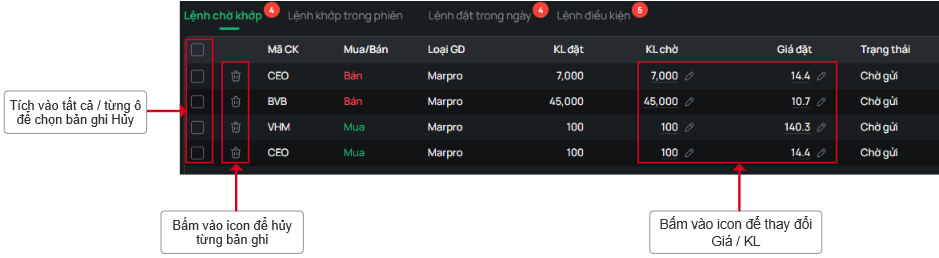
- From the order book on the quick order-placing screen:
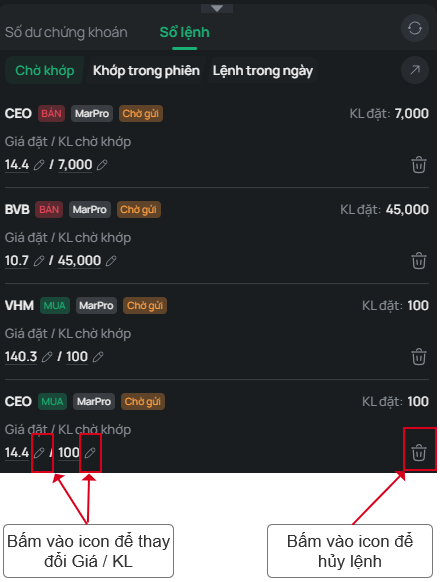
Note:
- Successfully submitting a cancellation/modification request does not mean that the order will be fully canceled/modified. The extent to which a cancellation/modification is executed depends on how much of the original order has already been matched at the time the cancellation/modification request reaches the Stock Exchange's system.
- To check the status of a cancellation/modification, select the Today's Orders tab.
- You cannot submit another cancellation/modification request for an order while a previous cancellation/modification request for that order is still being processed by the FPTS system.