


The steps to place orders are similar to place normal stock buy/sell orders
See more details here.
1. Intraday Buying Power (SMTN) Service
The Intraday Buying Power Service is an add-on service for customers using Margin Trading by Buying Power (EzMarginPro) that helps optimize trading buying power for short-term intraday trading. The Intraday Buying Power Service temporarily increases your account's buying power at the start of each trading session, by calculating the Margin Ratio (TLsm) for all margin securities symbols at the maximum level permitted under current regulatory rules (currently 50%). The increased buying power is valid only until the end of that trading session
Example of using the Intraday Buying Power service:
- At the end of day T: Your portfolio is as follows:
|
Symbol |
Ordinary securities |
Pending rights |
Market price |
TLsm |
Margin ratio for rights |
Leveraged buying power from securities |
|
(%) |
||||||
|
ACB |
2.000 |
0 |
20.000 |
50 |
35 |
20.000.000 |
|
HDM |
5.000 |
0 |
30.000 |
0 |
0 |
0 |
|
OCB |
10.000 |
5.000 |
15.000 |
40 |
28 |
81.000.000 |
|
TCH |
5.000 |
0 |
10.000 |
20 |
14 |
10.000.000 |
|
Total |
111.000.000 |
|||||
- If you register for the Intraday Buying Power service: Your margin ratio calculation will use the highest rate set by FPTS (currently 50%) for securities symbols eligible for margin lending. In this case, the leveraged buying power from ACB, OCB, and TCH shares will be calculated at a rate of 50% (including both the ordinary securities and pending rights portions). Specifically:
|
Symbol |
Ordinary securities |
Pending rights |
Market price |
Intraday margin ratio (%) |
Leveraged buying power from securities (after update) |
Buying power difference |
|
ACB |
2.000 |
0 |
20.000 |
50 |
20.000.000 |
0 |
|
HDM |
5.000 |
0 |
30.000 |
0 |
0 |
0 |
|
OCB |
10.000 |
5.000 |
15.000 |
50 |
112.500.000 |
31.500.000 |
|
TCH |
5.000 |
0 |
10.000 |
50 |
25.000.000 |
15.000.000 |
|
Total |
157.500.000 |
46.500.000 |
||||
- Your leveraged buying power from securities will increase by VND 46,500,000 → This is exactly the Intraday Buying Power amount
Note:
- The Intraday Buying Power (SMTN) amount is added to your leveraged buying power from securities and is updated only once, when the system opens the market for the next trading session.
- The intraday leveraged buying power from securities applies only to securities purchase transactions, and does not apply to other transactions such as cash withdrawals/transfers, rights exercises, etc.
- Symbols bought during the session will still be calculated using the regular loan ratio
- If your account currently has a negative base buying power: increasing the Intraday Buying Power (SMTN) will first offset the negative Base Buying Power (SMCS) balance → you will be able to use less of the SMTN amount than expected.
- After the trading session ends, the loan ratio for each margin securities symbol is calculated based on the rate FPTS publishes from time to time, as the basis for calculating your account's Loan Ratio (R)
2. Register to Intraday purchasing power service (SMTN)
a. On EzTrade
Follow the steps below:
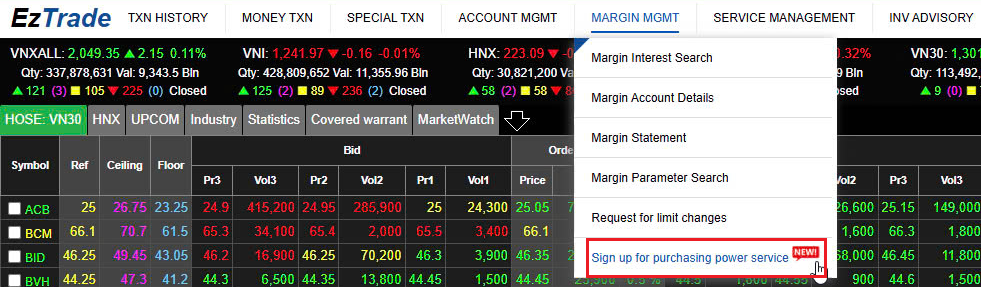
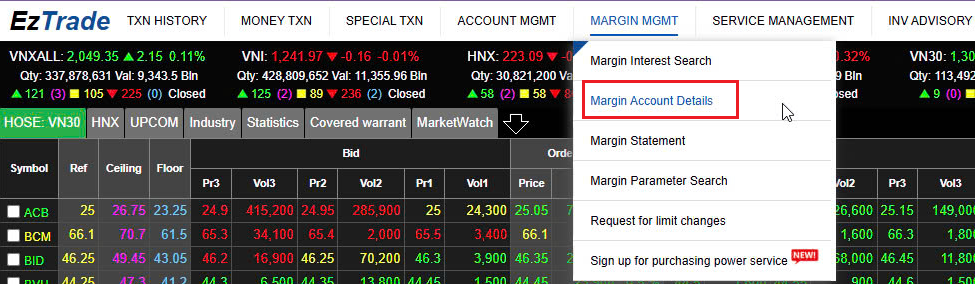
Step 1: After logging into trading account, you select Margin management and then Sign up purchasing power service

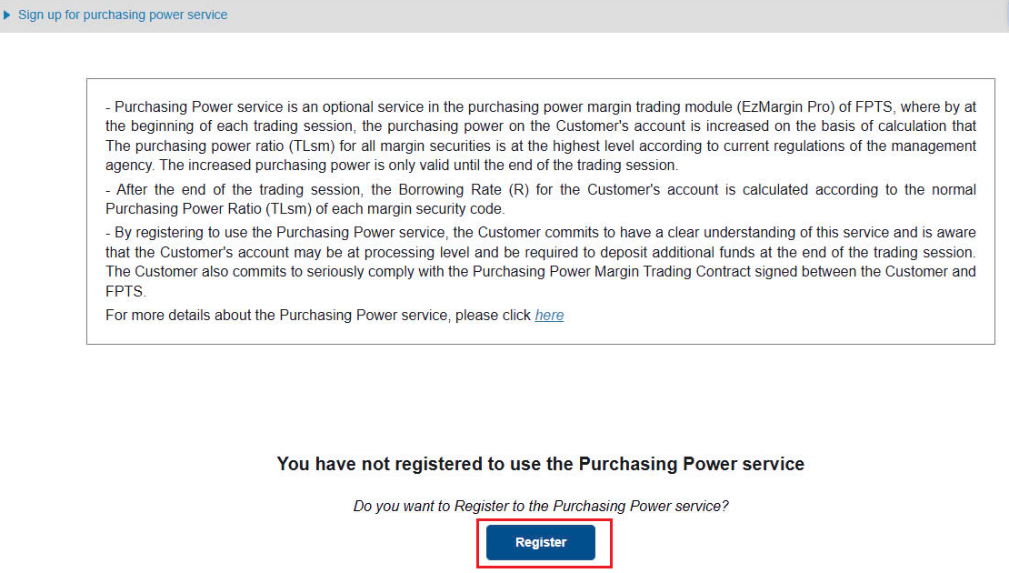
Step 2: Click Register Purchasing power service
Step 3: Confirm by the registered method (Email/SMS OTP/Smart OTP)
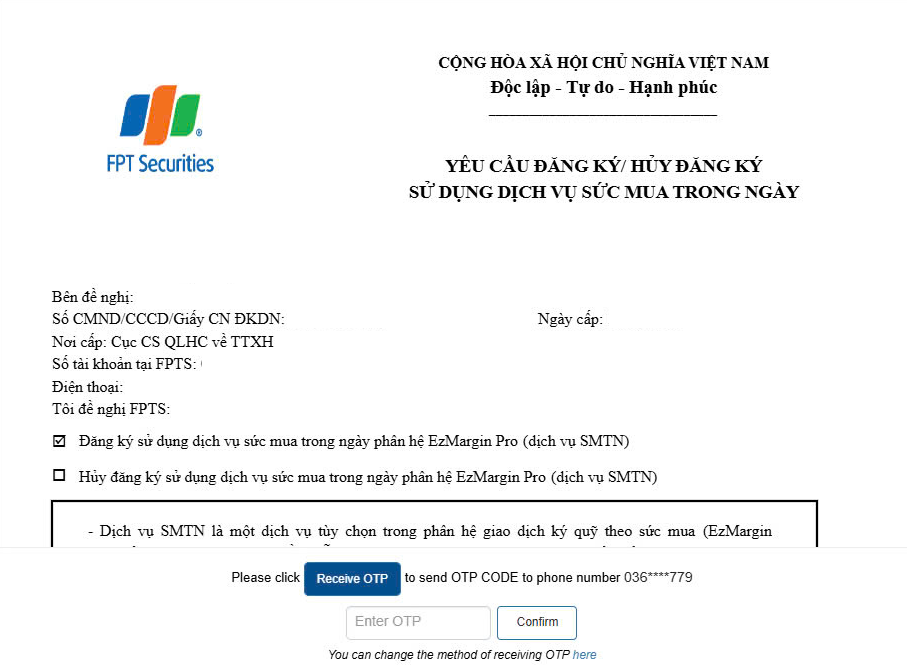
The service registration will take effect in the next working day.
b. On EzTrade mobile application
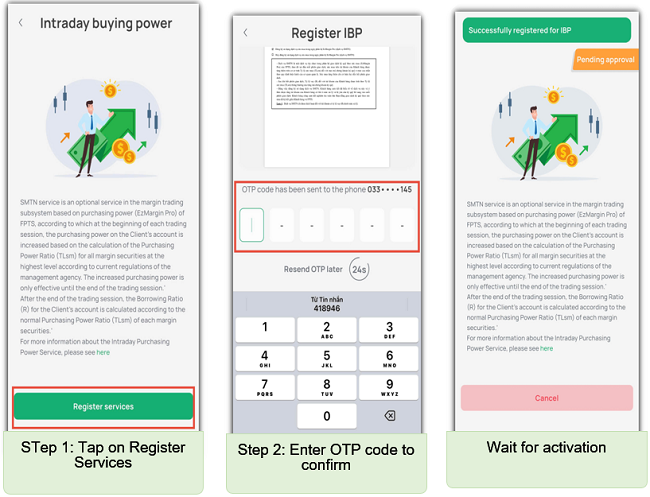
On the homescreen, tap on Feature icon, select Search All, then slide left to Loan Transaction, select Intraday Buying Power
This feature is only available to customers using EzMargin Pro account
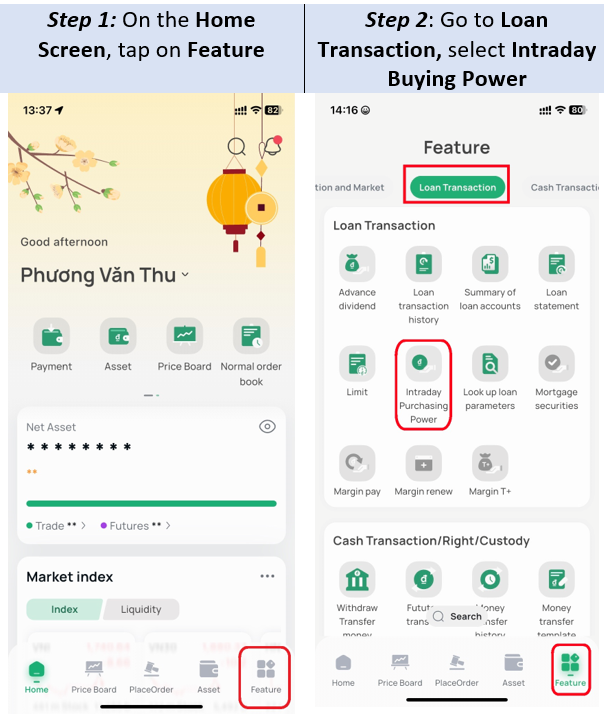
You must register for the Intraday Purchasing Power Service to use it. You must authenticate the registration using their registered authentication method (Email/SMS OTP/Smart OTP, etc.) to confirm the use of the service.
The service registration will take effect in the next working day.
3. Look up Intraday Purchasing Power
3.1. On EzTrade
Select Margin management taband select Margin Account Details
Customers may easily manage risks and look up details of Intraday buying power and the account status
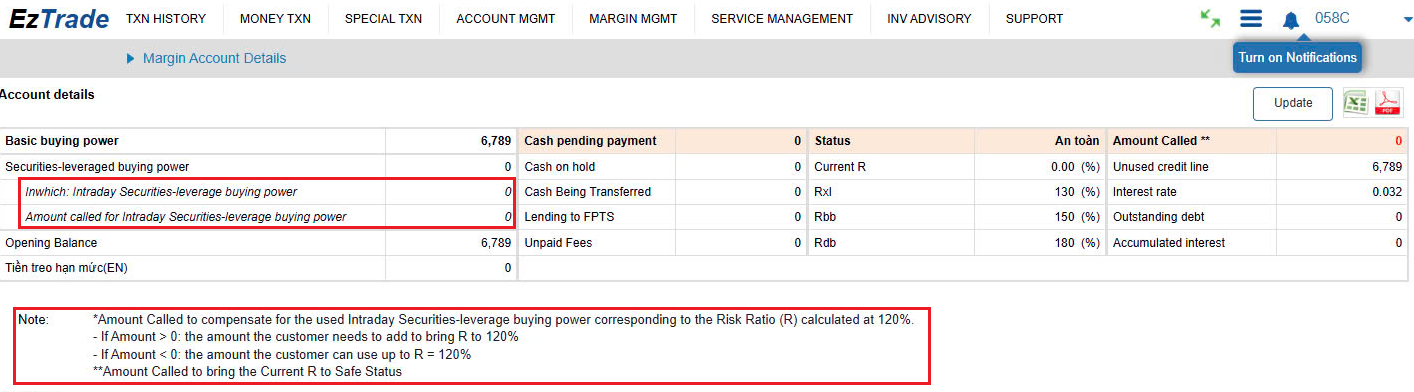
Note:
- The amount of money needed to be added for Intraday Buying Power used corresponds to the Risk Ratio (R), provisionally at 120%.
- If this amount is greater than 0, the amount needs to be added to bring R to 120%
- If this amount is below 0, the amount you may use is up to R = 120%
- In case the amount needed to be added for SMTN greater than, if you do not sell stocks/pay money for that amount, after FPTS runs its system, R of your account will be updated according to the regular margin rate -> the account status will be assigned to Settled status and our system will classify your EzMarginPro account according to applicable regulations.
3. 2. On EzTrade mobile application
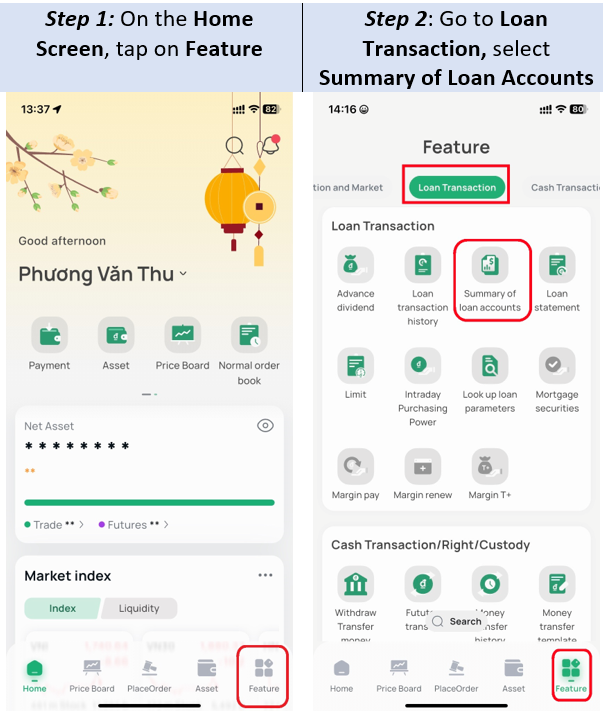
On the homescreen, tap on Feature icon, go to Loan Transaction, select Summary of Loan Accounts
In the Purchasing Power tab, tap the drop-down button in the Total Leveraged Margin Purchasing Power from stocks, the system will display information on both Margin Purchasing Power from stocks and Intraday Buying Power.
4. Cancel Intraday Purchasing Power service
Customers may cancel SMTN service at registration screen, following the instructions in Section 1. The cancellation will take effect in the following trading session.
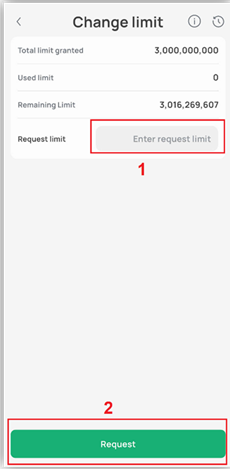
In case the room of margin loan is almost full and customers have the demand for more room, please do the following steps to apply for a new margin loan ratio:
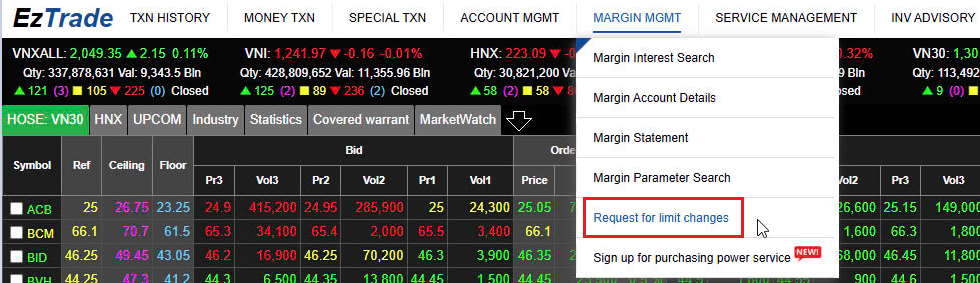
1. On EzTrade
SelectMargin Management tab and select Request for Limit changes
Enter the desired credit line limit box. Click Receive OTP, click the OTP code and click Confirm to send the request to FPTS. Customers can track the status and allowed ratios ratified by FPTS on the History item.
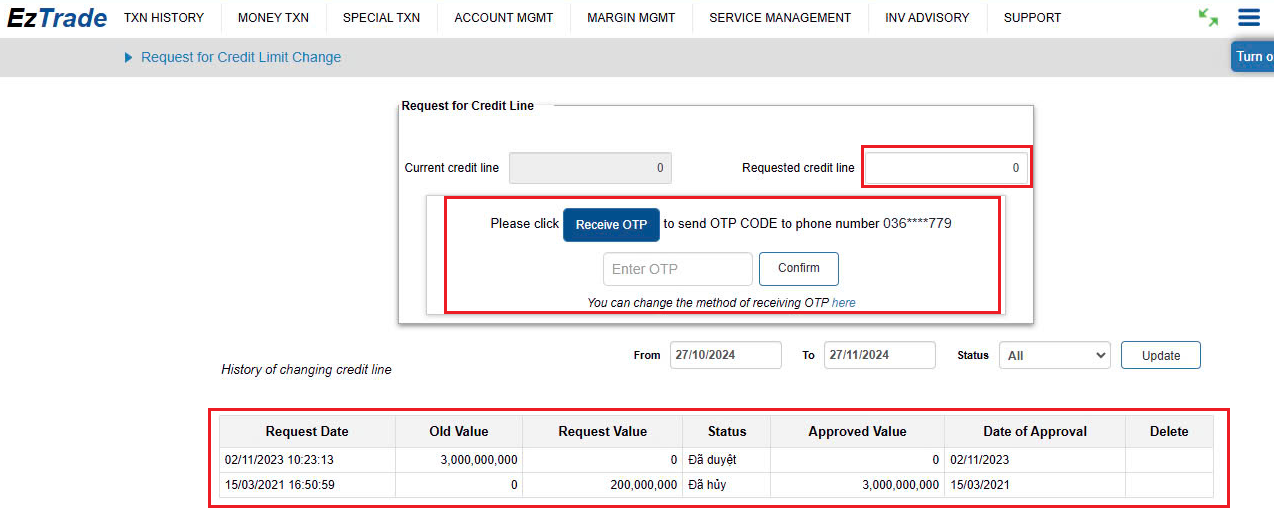
FPTS will receive the request and consider approving a reasonable credit limit suitable for each customer.
Note: The margin limit and margin rate may be adjusted by FPTS from time to time. In the event that any change to margin rates is made, the new rate will be immediately applied to all existing margin loans of the customer at the time of the change. In particular, the loan ratio may increase significantly when stock prices fall sharply or when FPTS adjusts the lending ratio of certain stocks.
2. On EzTrade mobile application
On the homescreen, tap on Feature icon, go to Loan Transaction, select Limit
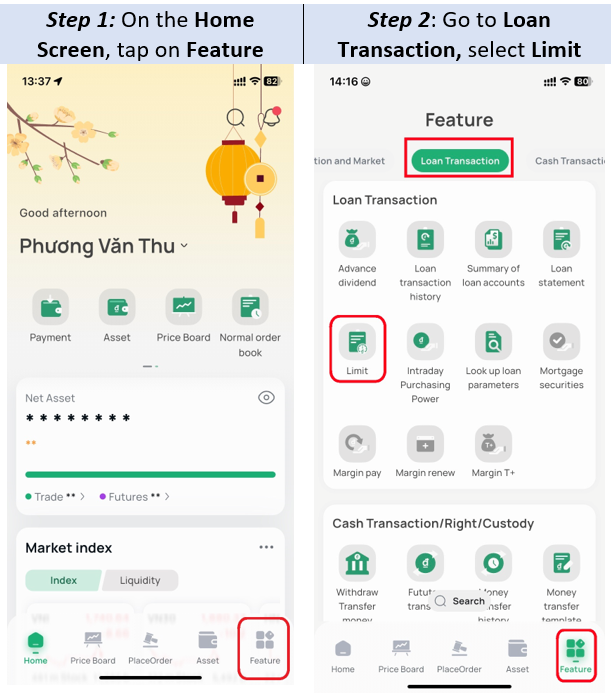
On the Limit screen, enter the new limit value you want
Note: The new margin limit must be greater than the current limit
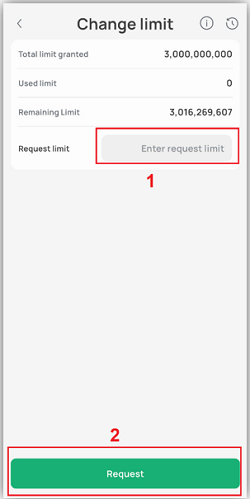
FPTS will receive the request and consider approving a reasonable credit limit suitable for each customer.
Note: The margin limit and margin rate may be adjusted by FPTS from time to time. In the event that any change to margin rates is made, the new rate will be applied to all existing margin loans of the customer at the time of the change. In particular, the loan ratio may increase significantly when stock prices fall sharply or when FPTS adjusts the lending ratio of certain stocks.
- The loan term is three (03) months from the date of disbursement of the margin loan based on buying power.
- The customer's loan will be automatically extended for another 03 months if the following conditions are met:
- The customer's account is not at the processing level
- The customer has paid the accumulated interest
- Margin call and Margin call term correspond to the following Borrowing Rate levels:
|
No. |
Handling level |
Description |
Time for assets supplementation/ securities selling(*) |
|
1 |
Normal handling |
130% < R ≤ 150% |
No later than 16:30 on T+2 day |
|
2 |
Mandatory handling |
150% < R ≤ 180% |
No later than 16:30 on T+1 day |
|
3 |
Special handling |
R > 180% |
No later than 16:30 on T day |
(*) The time at which you add margin assets is the moment when your account is credited by FPTS with the additional margin cash/securities or when your securities sell order is executed. T day is calculated as the first day that your account falls into one of the handling levels.
- Method of selling: If the deadline for adding assets/selling securities of the margin call and the Loan Ratio (R) remains above 130%, the customer is considered to be unable to pay on time and FPTS has the full right to proactively sell the securities available in the customer's account to fully recover the entire loan principal, loan interest and any related fees. FPTS decides to sell part or all of the securities in the account as well as the timing, order type and selling price (selling at floor price or selling according to ATO, ATC and MTL orders).
1. Purchasing power
1.1 Buying power (SMCS)
- Buying power is the purchasing power of the account before you place orders to buy securities
- Calculation formula:
SMCS = Cash + Pending buy money + Money in transit + Leveraged purchasing power from stocks - (Debit balance + Accumulated EzMargin Pro interest) - Suspended purchase money
Wherein:
- Cash: cash of customers
- Pending buy money: the pending payment of customers (reduced the advance fee)
- Leveraged purchasing power from stocks: the leveraged stock value
- Outstanding balance: the amount FPTS disbursed to customers
- Accumulated EzMarginPro interest is EzMarginPro interest accumulated daily, calculated from the previous interest collection time
- Suspended purchase money: the principal (suspended from SMCS) when placing orders to buy stocks.
1.2 Aggregate Buying Power (SMTH)
- SMTH is purchasing power after applied leverage, corresponding to the securities in the buy order. SMTH will be displayed on the Buy order screen after you enter the securities code. If the securities code is not part of the Margin Pro list, then SMTH = SMCS.
- Formula: SMTH = SMCS / (1 - TLsm of that securities code)
2. Loan interest
- Loan interest is calculated daily, decided by FPTS for each period. When interest rate changes, the new interest rate will be applied immediately to the outstanding balance at that time
- Loan interest is calculated daily (including holidays, Saturdays and Sundays) based on the actual margin balance and daily interest rate
- Calculation formula: Loan interest = End-of-day margin balance x Loan interest rate
- Loan interest calculation period: From the 25th of the previous month to the end of the 24th of this month
- Loan interest payment date is the 25th of each month or the next working day if the 25th is a day off, holiday, Saturday and Sunday. On the payment date, the loan interest will be converted into a loan and added to the margin balance
3. Loan ratio
- Loan ratio (R): the percentage (%) between the Margin loan balance (after reducing cash, pending money from selling securities) and the converted securities value

- Wherein
- Margin loan balance: the amount of margin loan up to the present time
- Accumulated loan interest: the total unpaid margin interest, accumulated up to the present time
- Converted securities value = ∑(Number of margin securities * Loan price * TLsm)
- Loan price is the smallest value between the closing price of the securities at the most recent trading session and the maximum price FPTS stipulates for that security code
- You should fully understand the calculation methods, processing levels and additional margin requirements of your margin account to take timely and appropriate action.
4. Suspend lending stocks in the portfolio
When lending stocks reaches the limit prescribed by the State Securities Commission, FPTS will suspend lending for that stock. For example: the number of stocks lent exceeds 5% of the number of listed securities of those stocks or the loan balance of a stock exceeds 10% of FPTS's equity.
- For suspended lending stocks, the whole value of that stocks will not be included in the purchasing power when trading, however, this does not affect the loan ratio R.
5. Request for canceling EzMarginPro service
- If you want to cancel EzMarginPro service, you need:
- Sign the information change form to request for canceling EzMarginPro service
- Have enough cash in your account to pay the principal and interest
- Follow the steps below:
- Please go to FPTS transaction counters in person to sign the request form (do not process via phones).
- FPTS will proceed to collect the outstanding principal and accrued interest and terminate the EzMarginPro service for your account.
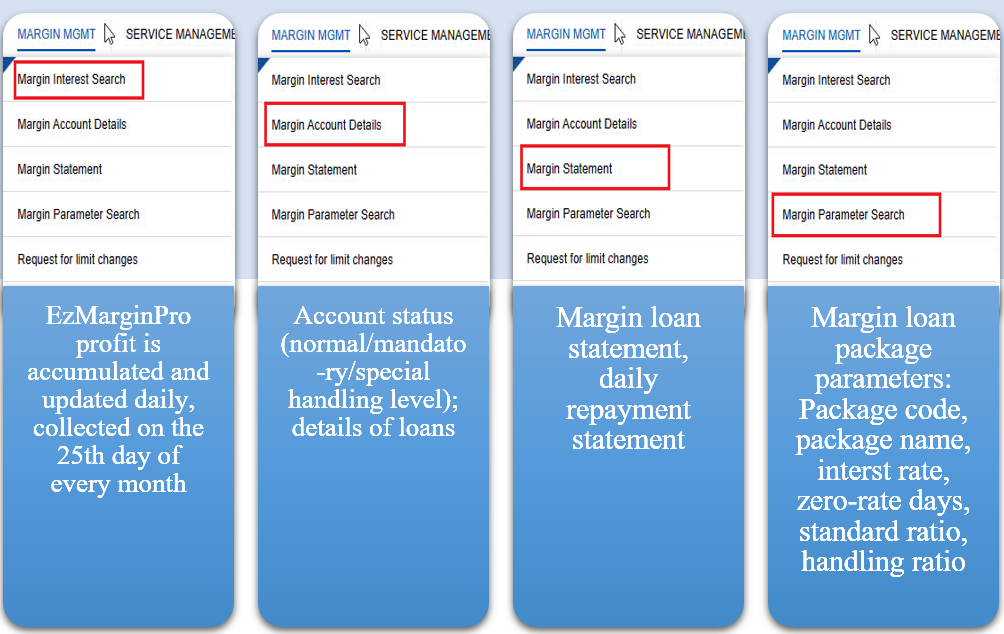
6. Search margin information
On EzTrade, select Margin Management tab
7. Handling Levels and Automatic Sell Orders for Accounts Using Margin Services - EzMarginPro
- Specific cases of selling as follows:
o Regular handling level (RXL) = 130% → R > RXL, the loan will fall into the regular handling level. When your account remains at this level for three consecutive trading days (T+0, T+1, T+2) => Automatic selling:
- Automatic selling order is created at 19:00 on T+2 (to sell on the next trading day T+3).
- The quantity sold for each stock is proportional to the number of securities in the portfolio (selling to bring R to 130%).
o Forced handling level (RBB) = 150% → R > RBB, the loan will fall into the forced handling level. When your account remains at this level for two consecutive trading days (T+0, T+1) => Automatic selling:
- Automatic selling order is created at 19:00 on T+1 (to sell on the next trading day T+2).
- The quantity sold for each stock is proportional to the number of securities in the portfolio (selling to bring R to 130%).
o Special handling level (RDB) = 180% → R > RDB, the loan will fall into the special handling level. When your account falls into this level => Automatic selling:
- Automatic selling order is created at 19:00 on T+0 (to sell on the next trading day T+1).
- Selling quantity: Sell all the number of margin securities that can be sold (securities in the MarPro portfolio).
- Selling price: The system automatically places sell orders at the floor price.